
Reki: record the meeting, let AI take the notes
Reki: record the meeting, let AI take the notes
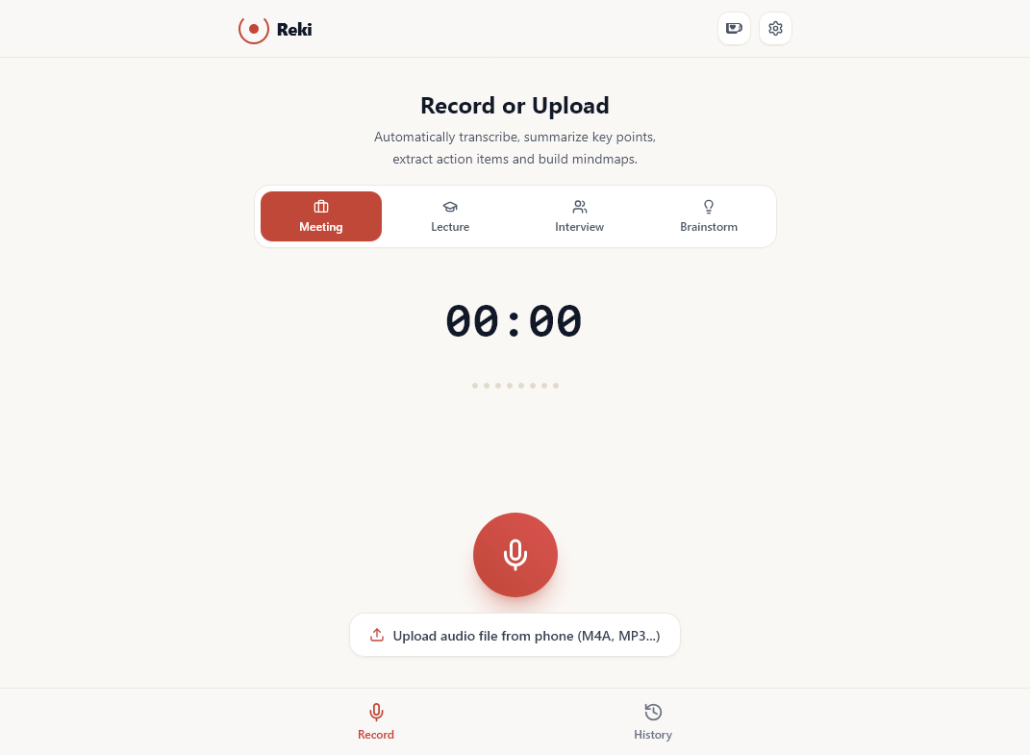
Reki is a small web app I built: press record, have your meeting as usual, and when it ends you get a summary, a list of action items, a mind map and a full transcript.
The idea came from a familiar problem. You try to listen and take notes at the same time, and you miss half of the one sentence that mattered. Then you spend another fifteen minutes after the meeting cleaning up your notes. I wanted to stay in the conversation and let the software do the writing.
The name Reki is inspired by the Japanese language and the idea of 記録 (kiroku), meaning “record” or “keeping a log”. The design follows the same philosophy: warm paper tones, a single vermilion accent, and nothing unnecessary.
What Reki does
You either record live in the browser or upload a file you already have, such as an M4A from your phone’s voice recorder. Before recording, pick a style: work meeting, lecture, interview or brainstorm. Each style tells the AI what to pay attention to.
A few minutes later you get:
- Summary: two to four sentences on what the conversation was about.
- Key points: the decisions, numbers and ideas worth remembering.
- Action items: a checklist you can tick off, with owners and deadlines when someone said them.
- Mind map: a visual outline of the main topics.
- Full transcript: everything that was said, split into readable paragraphs and labelled by speaker.
- Ask AI: questions about the recording, like “Who is sending the report?” or “What did we decide about the budget?”
Reki works in English, Vietnamese and Japanese, has a light and a dark theme, and can be added to your phone’s home screen like a regular app.
Your recordings stay with you
Reki has no accounts and no cloud library. Recordings, summaries and chat history are stored in your own browser, on your own device.
The audio leaves your device only to be analysed. It goes to my server, which passes it to Google Gemini. Once the analysis succeeds, the file is deleted from Google. If you want a copy of everything, export a JSON backup from Settings and restore it on another device.
The Gemini API key lives only on the server. Your browser never sees it.
Behind the scenes
Reki runs on ordinary shared hosting, the kind that costs a few dollars a month. The front end is React; the back end is a handful of PHP files.
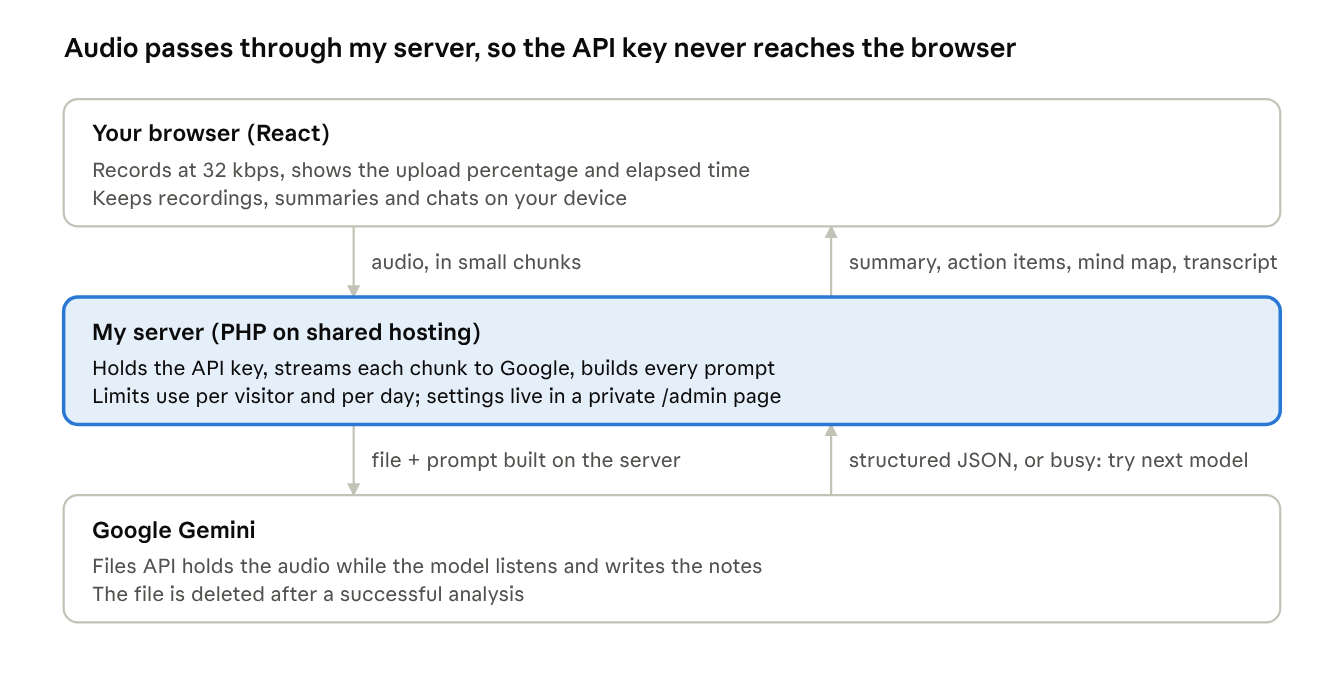
How Reki works · browser, server, Gemini
A few details made it work well on cheap hosting:
- Chunked, resumable uploads. Shared hosts often reject large uploads. Reki sends audio in small pieces, so a two-hour recording goes through, and a dropped connection picks up where it left off.
- Backup models. When Google’s servers are busy, Reki switches to a backup model automatically, without uploading the audio again.
- Structured output. Gemini returns JSON in a fixed shape, so the summary, action items, mind map and transcript always land in the right place.
- A small admin page. I set the API key, models and usage limits from the browser instead of editing files over FTP.
What I learned building it
- The first version only worked for short recordings. It sent the whole file in a single request and gave up after 25 seconds. A long meeting either timed out or was too large to send. Moving to chunked uploads and the Gemini Files API fixed both.
- Retries can cost money. When a request timed out, the app quietly re-sent the entire audio to a backup model, sometimes three times. Now a retry reuses the file that is already uploaded.
- A public AI endpoint needs guardrails. If the browser can send any prompt, anyone can use your API key for free. Reki’s server builds every prompt itself and caps usage per visitor and per day.
- Speech doesn’t need music quality. Recording at 32 kbps instead of the browser default makes files three to four times smaller. Uploads get faster, and the AI hears no difference.
- People want to see progress. A spinner with no end feels broken. A real percentage during upload and an elapsed-time counter during analysis made the wait much easier.
Try it
Reki is free and needs no sign-up. Open it at https://reki.dustinle.ca on your phone or laptop, press record, and see what it gives you after your next meeting. On a phone, use “Add to Home Screen” to keep it one tap away.
Every analysis costs real money in AI and server fees. If Reki saves you time, you can buy me a coffee on Ko-fi. It helps keep the app free and improving.
I’d love to hear what works and what doesn’t. Feedback is welcome.
Leave a Reply
Want to join the discussion?Feel free to contribute!